Using Modern
Why the titles hang
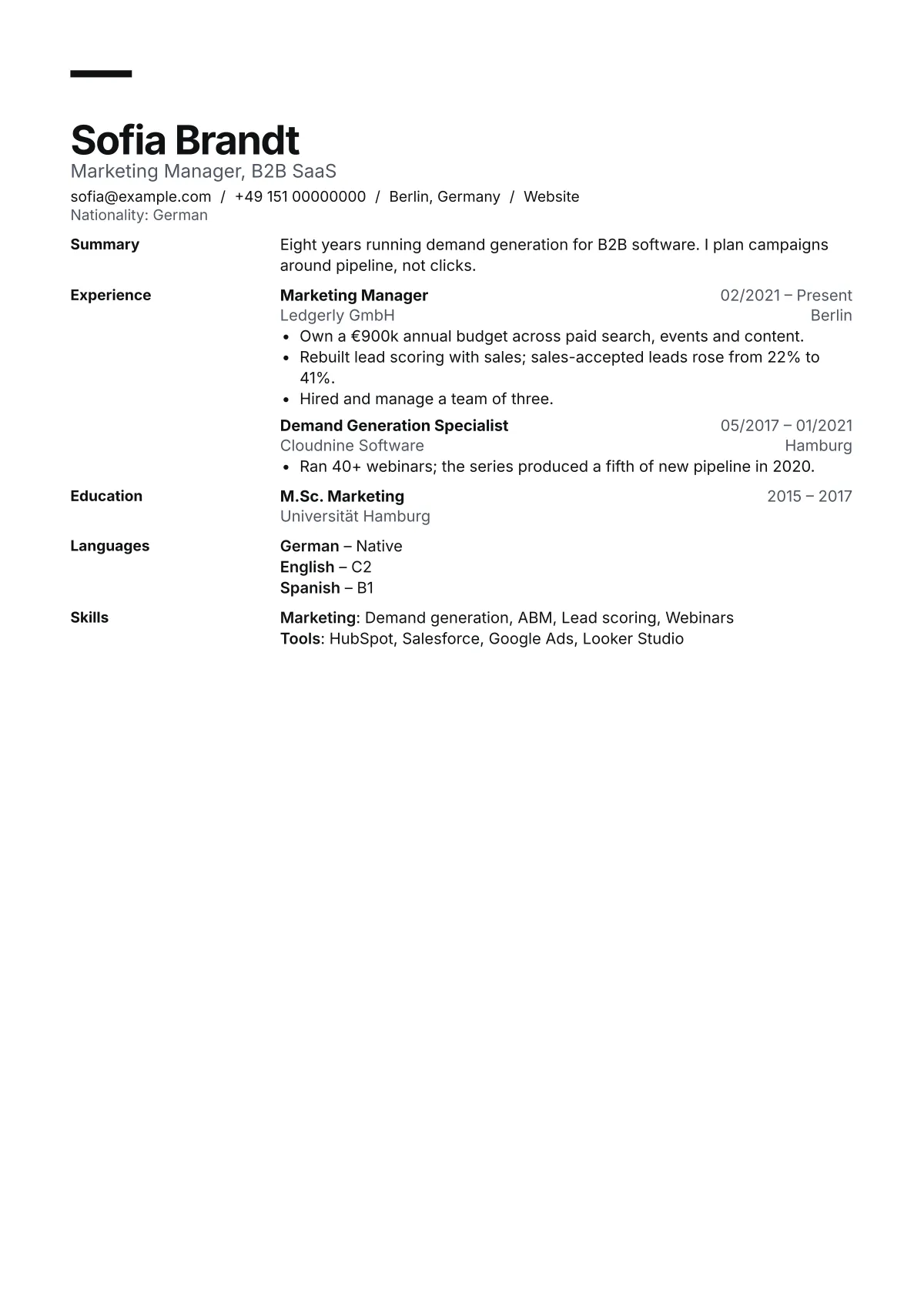
Setting Experience, Education and Skills in a margin column gives each section a clear start without large headings or rules. Each title sits on the same line as its first entry, so in the PDF's text it still comes right before what it labels.
How to fill it
Write a two-line summary that names your field and the result you are known for; Modern gives it a full row. Lead each bullet with the outcome and a number where you have one, such as budget, pipeline or team size, the way the sample's first bullet does.
When to pick another
The margin column takes width, so very long job titles wrap sooner than in Ledger. If you are applying to a conservative employer, such as a bank or a public body, Ledger is the quieter choice.
Words to use
The layout is half of it. For the terms recruiters search for, see the keyword lists for digital marketer, product manager and content writer resumes.
About Modern
Is Modern ATS friendly?
In our parse-back tests every field came out in order on all four samples, at three densities and two paper sizes. The dated results are on this page.
Can I change the accent bar colour?
Yes. The bar and section titles take the accent you pick in the Design tab. Ink, violet, navy, forest, oxblood and slate are all 4.5:1 or better on white.
Does Modern work for a career change?
Yes. Put a summary that names the move, then a Skills section before Experience, so the reader sees what carries over before the job titles.