Using Ledger
Why one column
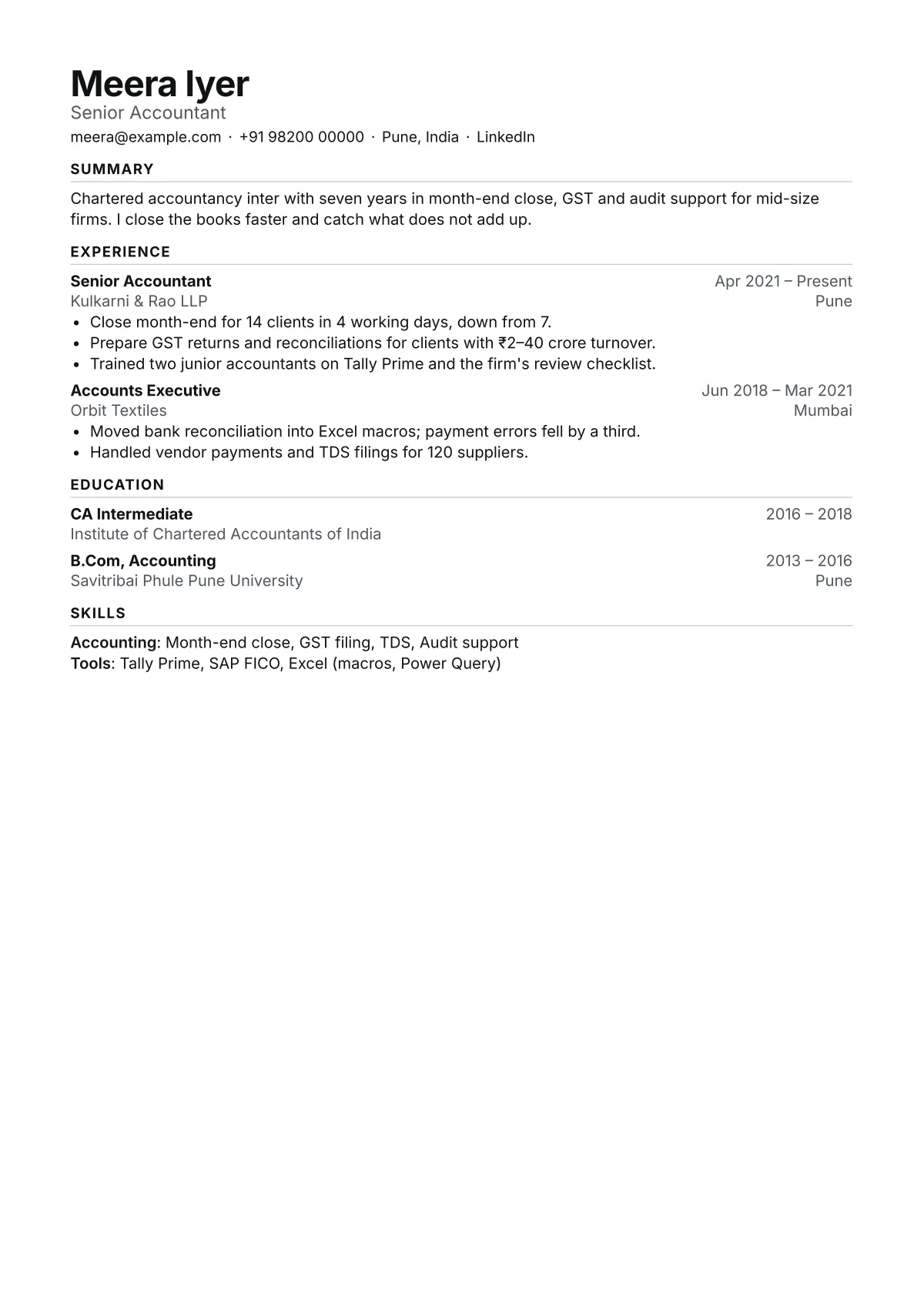
A parser reads a PDF as a stream of text. With one column, that stream is the same order a recruiter's eye follows: name, contact line, summary, then each job with its title, dates and employer. Nothing sits beside anything else, so nothing can be read out of turn.
How to fill it
Keep the headline to your target job title, not a slogan. Put three to five bullets under your latest job and two under older ones; Ledger gives every bullet the same weight, so the order you choose is the order it is read. Group skills under two or three labels such as Accounting and Tools rather than one long list.
When to pick another
If your skills list runs past ten tools, Column gives it a sidebar. If you are a student who needs projects and coursework on one page, Plain fits more lines.
Words to use
The layout is half of it. For the terms recruiters search for, see the keyword lists for business analyst, operations manager and project manager resumes.
About Ledger
Does Ledger fit on one page?
With the sample's two jobs and one qualification, yes, at all three densities. A longer history flows onto a second page; the preview shows the page count as you type.
Can I change the heading colour?
Yes. Ledger takes any of the six accent colours in the Design tab, all at 4.5:1 contrast or better on white. Ink is the default.
Is Ledger good for a CV in the UK or India?
Yes. Choose the country format when you start and the document name, paper size, date style and personal details change to match. The layout stays the same.